 how-to
7 Proven Ways to Fix Operational Bottlenecks
Last Updated: October 26, 2026
Quick Summary
The best ways to fix operational bottlenecks start with scoring each constraint by hours lost per week, revenue impact, effort to fix, and reversibility risk, then fixing one constraint at a time and re-measuring before moving to the next. Relieving a non-constraint step only moves the queue, so you must fix the actual constraint rather than the symptom.
- Score bottlenecks on hours lost per week and effort to fix, doing high-impact, low-effort quick wins first.
- Weight hours lost at 40% and revenue or service impact at 30% when ranking candidate bottlenecks.
- Automate only stable, high-volume, low-variance steps with clean input data and a named owner.
- Record a baseline for two weeks using two or three KPIs, then review results at 30 and 90 days.
- Synergy clients report an average of 20+ hours saved per month and $18,500 saved annually.
Table of Contents
- Why Fixing Operational Bottlenecks Starts With a Diagnostic Framework
- How to Identify Workflow Bottlenecks Before They Cost You
- Operational Bottleneck Examples You'll Recognize
- Root Cause Analysis for Process Problems
- Workflow Automation for Small Business: Where It Helps and Where It Hurts
- Measuring Before and After With Practical KPIs
- Getting Your Team to Adopt the Fix
- Book a Bottleneck Audit With Synergy Business Group
- Frequently Asked Questions
Why Fixing Operational Bottlenecks Starts With a Diagnostic Framework
Most teams attack operational bottlenecks by instinct. They fix whatever feels most painful, then wonder why the same delays come back a month later. The best ways to fix operational bottlenecks start with a scoring system, not a hunch. A bottleneck is any step in your process that limits the flow of work around it, and the constraint always sets your overall pace.
Scoring Bottlenecks by Impact and Effort
Score each bottleneck on two axes: hours lost per week and effort to fix. High impact plus low effort goes first. Low impact plus high effort waits.
- Quick wins: small fix, big time recovery. Do these this month.
- Big projects: high impact, high effort. Plan and budget them.
- Fill-ins: low impact, low effort. Batch them when you have slack.
That ranking alone stops most teams from wasting a quarter on the wrong problem. For a broader view of how diagnostics fit into overall improvement, see our guide on improving business operational efficiency.
A Prioritization Score You Can Apply This Week
A two-by-two grid is a start, but it does not tell you which of three "quick wins" to do first. Add a simple weighted score so the ranking is defensible and repeatable. For each candidate bottleneck, rate four factors from 1 to 5 and multiply by a weight:
| Factor | What It Measures | Weight |
|---|---|---|
| Hours lost per week | Total staff and customer time the constraint consumes | 40% |
| Revenue or service impact | Orders delayed, churn risk, penalty exposure, or customer wait | 30% |
| Effort to fix | People, budget, and system changes required (reverse-scored: 5 = low effort) | 20% |
| Reversibility risk | How hard it is to undo if the fix underperforms (reverse-scored) | 10% |
Multiply each rating by its weight, sum the four results, and rank. A bottleneck that loses 30 hours a week but needs a six-month system migration will usually rank below one that loses 12 hours a week and can be fixed with a rule change. The score is not a substitute for judgment, but it forces the conversation onto evidence instead of whoever complained last.
Sequencing: Fix the Constraint, Not the Symptom
Once you have a ranked list, fix one constraint at a time and re-measure before moving to the next. This is the core of constraint-based improvement: relieving a non-constraint step just moves the queue. If your order approval is the constraint, speeding up invoicing will not shorten delivery time; it will only build a larger pile in front of approval.
The Cost of Leaving a Bottleneck Alone
A stuck approval that adds two days to every order compounds quietly. Ten orders a week becomes twenty lost days a month. Nothing dramatic happens. The cost hides in overtime, missed deadlines, and customers who stop calling back. Put a dollar figure on it before you prioritize: multiply the hours lost per week by a loaded hourly rate, then add any late-delivery penalties or lost repeat business you can reasonably attribute.
How to Identify Workflow Bottlenecks Before They Cost You
You find workflow bottlenecks by watching where work piles up, not where people complain loudest. Three signals expose them fast: growing queues, repeated handoffs, and steps that always need a second look.
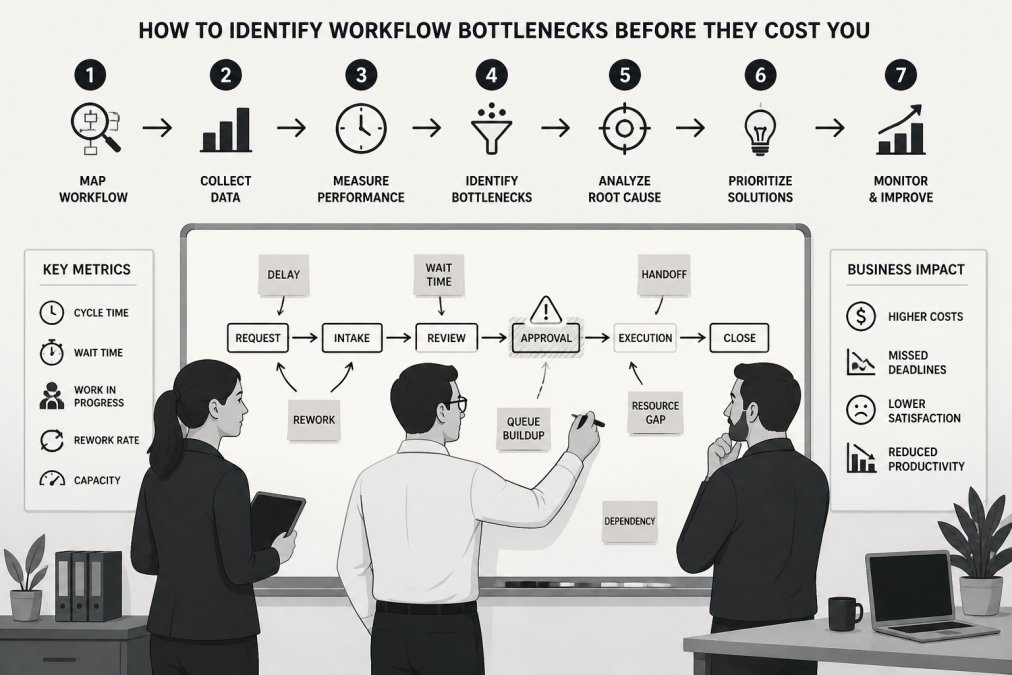
Mapping the Process Flow
Walk the process from first touch to delivery. Write each step on a sticky note or a shared board. Mark every handoff between people or systems. Handoffs are where delays breed.
Then ask one question per step: does this step ever wait? The steps that wait most are your suspects.
Reading Performance Data and Queue Signals
Your systems already hold the evidence. Check for:
- Backlogs that grow faster than you clear them
- Cycle time creeping up on the same task type
- Work in progress stacking up before one specific step
A queue that forms in front of one step points to a capacity constraint, not a motivation problem. Treat it that way.
Operational Bottleneck Examples You'll Recognize
Here are the patterns we see most often in small and mid-sized businesses. If two or three feel familiar, you already have your shortlist.
- One-person approvals. Every purchase, quote, or hire waits on the owner's inbox.
- Manual data entry. The same customer details get typed into three systems.
- Repeated status meetings. Half the meeting is people asking where things stand.
Administrative bottlenecks like these drain hours every week. Our practical guide to reducing daily administrative tasks covers how to claw that time back.
Root Cause Analysis for Process Problems
Root cause analysis for process problems means asking why until you reach the system failure, not the person who happened to be holding it. The symptom is the late report. The cause is a missing template, an unclear owner, or a step nobody designed on purpose.
The 5 Whys Walkthrough
Start with the visible problem and ask "why" five times.
- Why was the invoice late? The approval sat for four days.
- Why did it sit? It went to a manager who was traveling.
- Why that manager? They are the only approver for that amount.
- Why only one approver? The rule was never updated as the team grew.
- Why not updated? Nobody owns approval rules.
The fix is a second approver and a written rule, not a reminder email. A common mistake is stopping at why number two, which only produces blame.
Separating Symptoms From Causes
Symptoms reappear after a patch. Causes disappear when you fix them. If your fix needs a weekly reminder to keep working, you treated a symptom.
Workflow Automation for Small Business: Where It Helps and Where It Hurts
Workflow automation for small business pays off on repeatable, rule-based steps: data entry, reminders, routing, and status updates. It hurts when you automate a broken process, because you just get the mess faster and harder to unwind.
Automate these first:
- Copying data between your CRM and invoicing
- Sending follow-up emails on a set trigger
- Routing requests to the right person
Hold off on anything that needs judgment, negotiation, or context a rule cannot capture. If you want the full sequence, our step-by-step guide on booking a business automation audit walks through it.
A Decision Test Before You Automate
Before you buy a tool or build a workflow, run the step through four questions. If any answer is "no," fix the process first or leave it manual.
- Is the step stable? Has the rule or form stayed the same for at least a quarter? Automating a process that changes monthly means rebuilding the automation monthly.
- Is it high-volume and low-variance? Automation earns its keep on steps repeated many times with few exceptions. A task done twice a week with a different twist each time is a poor candidate.
- Is the input clean? If the data entering the step is incomplete or inconsistent, automation will propagate errors faster. Clean the source first.
- Is there an owner? Someone must monitor failures, update rules, and handle exceptions. Automation without an owner becomes silent breakage.
The Trade-Offs Nobody Warns You About
Automation is not free even when the tool is cheap. The real costs show up in maintenance, exception handling, and lost flexibility.
- Maintenance load. Every automated workflow needs someone to watch for failed runs, changed field names, and expired credentials. A workflow that saves four hours a week but consumes two hours of troubleshooting is a thin win.
- Exception handling. Rules handle the common case; people handle the odd one. If 20% of cases are exceptions, you may spend more time correcting automated output than you saved.
- Hidden coupling. Automations that touch multiple systems create dependencies. A change in your invoicing platform can silently break a CRM sync, and the failure may not surface until a customer complains.
When to Leave It Manual
Keep a step manual when it involves negotiation, relationship judgment, unusual inputs, or a low volume that does not justify setup and maintenance. A small team processing a handful of custom quotes a week will usually lose money automating the quote build, because the exceptions outnumber the standard cases. The right question is not "can this be automated?" but "will automation remove more work than it creates, including the work of maintaining it?" Answer that with your baseline numbers before you commit.
Measuring Before and After With Practical KPIs
Measure the bottleneck before you touch it, or you will never prove the fix worked. Pick two or three KPIs and record a baseline for two weeks.
| KPI | What It Shows | Baseline Example | Target After Fix |
|---|---|---|---|
| Cycle time | Total time from request to done | 6 days | 3 days |
| Waiting time | Hours work sits idle per step | 14 hrs/week | 4 hrs/week |
| Backlog size | Items queued at the constraint | 40 open | Under 15 |
| Handoffs per case | How many people touch it | 5 | 3 |
| Rework rate | Cases sent back for fixes | 1 in 5 | 1 in 20 |
Review the numbers at 30 and 90 days. If cycle time drops but rework climbs, the fix moved the problem instead of solving it.
Getting Your Team to Adopt the Fix
Adoption fails when the fix is done to people rather than with them. The staff closest to a bottleneck usually know its cause and have simply stopped mentioning it.
Practical steps that work:
- Run a short session with the people who do the work daily
- Explain what changes for them, not just for the business
- Pick one respected team member to pilot the new process
Watch out: rolling out a new process without training time built in guarantees quiet resistance. When you are ready for expert help with adoption, you can schedule a consultation with our team.
Book a Bottleneck Audit With Synergy Business Group
Finding the constraint is one thing. Removing it without breaking the rest of your operation is where most teams stall. Synergy Business Group runs deep process bottleneck audits and then builds the fixes: custom workflow automation, CRM pipeline repair, and compliant HR and payroll workflows.
You can Book Consultation and get three specific ways to cut bottlenecks, automate workflows, and save costs.
Frequently Asked Questions
How do you measure whether a bottleneck fix is working?
Pick two or three KPIs tied to the bottleneck before you change anything: cycle time, waiting time, backlog size, or work in progress. Record a baseline over two to four weeks, then compare the same metrics after the fix. A real improvement shows up as shorter cycle time or a smaller queue without a rise in rework. If numbers move but customer complaints or error rates climb, the fix shifted the problem rather than solving it.
What are common operational bottleneck examples in a small business?
The most frequent ones sit in handoffs and approvals. A sales rep waits two days for a quote to be approved, a new hire waits on IT access, or one person manually re-enters data from email into the CRM. Other examples include a single approver signing off on every purchase, a backlog at month-end invoicing, and scheduling conflicts where one specialist is booked while others sit idle. Each one shows up as waiting time or a growing queue.
How can workflow automation for small business reduce bottlenecks?
Automation removes the manual, repetitive steps that create queues: data entry between systems, routing approvals, sending follow-ups, and updating records. It works best on high-volume, rule-based tasks with clear triggers. It does not fix a bottleneck caused by unclear roles or a missing decision-maker. Map the process first, confirm the root cause, then automate only the steps that genuinely slow the flow.
How do you identify workflow bottlenecks without expensive software?
Walk the process yourself and time each step, then ask the people doing the work where they wait. Look for piles of work in progress, steps that sit idle between handoffs, and tasks only one person can do. A simple spreadsheet tracking start and end dates per step over a few weeks will reveal where cycle time balloons. You can identify workflow bottlenecks this way before spending anything on tools.
Your bottleneck will not fix itself, and every week it runs costs you hours you cannot bill. Get started with Synergy Business Group and turn your slowest step into your fastest one.