 How-to
How to Reduce Duplicate Customer Records in CRM
Last Updated: November 24, 2026
Quick Summary
To reduce duplicate customer records, treat them as a data quality problem first: run your CRM's native duplicate report weekly, match on strong identifiers like email and mobile number, merge safely while preserving history and consent, and fix every entry point that creates records. Prevention at web forms, imports, and integrations stops duplicates from returning.
- Run the native duplicate report weekly rather than once, and tighten match rules if thousands of pairs are flagged.
- Require two fields to agree before matching, and route fuzzy matches to manual review instead of auto-merging.
- Pick the surviving record by the most complete history, not the oldest creation date.
- Keep the most restrictive valid consent state during a merge unless the customer opted in again.
- Set integrations to match on email or mobile number rather than create, since they compound duplicates unattended.
Table of Contents
- Why Duplicate Customer Records Clutter Your CRM
- Common Causes of Duplicate Leads and Contacts
- How to Find Duplicate Records in CRM
- CRM Duplicate Detection Rules That Actually Work
- How to Merge Duplicate Contacts in CRM Without Losing History
- CRM Deduplication Tools: What to Look For
- Preventing Duplicates Across Web Forms, Imports, and Integrations
- Booking a CRM Cleanup Consultation
- Frequently Asked Questions
Why Duplicate Customer Records Clutter Your CRM
Duplicate customer records are two or more entries in your CRM describing the same person or company, splitting a single customer's history across multiple files. Duplicate records are best treated as a data quality problem first and a software problem second, because no cleanup tool fixes a process that keeps creating them.
Most guides jump straight to merge buttons, but merging is the last step. Merge duplicates without fixing the cause and they return within weeks.
The real cost shows up in daily work:
- Sales follow-up breaks. Two reps call the same lead. One sees a cold note, the other sees a warm one.
- Reporting accuracy drops. Your unique customer count is inflated, so every growth metric is wrong.
- Lead routing misfires. A duplicate lead gets assigned twice and worked once.
- Customer experience suffers. People get the same email twice, or a rep asks a question they already answered.
Data clutter also hides inside integrations. One record arrives from a web form, another from an import, a third from your accounting tool. Each looks valid on its own.
The fix has three parts: find the duplicates, merge them safely, and stop new ones from forming. Below, we walk through each step in order.
Common Causes of Duplicate Leads and Contacts
Most duplicate leads come from one of five sources, and each needs a different fix. Fixing data entry alone will not help if your integrations keep pushing new records.
1. Manual entry at speed. A rep types a name and phone number during a call. A colleague types the same person later. Different spelling, same human.
2. Imports without a match check. Someone uploads a trade show list. The CRM creates every row as a new record, even the ones already there.
3. Web forms that always create. A form submission creates a fresh contact every time. A returning visitor fills the form again and gets a second profile.
4. Integrations that push instead of match. Your email tool, booking tool, or accounting software sends contacts over.
5. No standard formats. One record says "Suite 200," another "Ste 200." One email is lowercase, one capitalized. Exact matching then fails.
A common mistake is blaming the team. In practice, the process allows the duplicate.
How to Find Duplicate Records in CRM
Start with a duplicate report, not a manual scan. Most CRMs include a built-in duplicate detection report or a saved search you can run on demand.
Step 1: Run the native duplicate report. Find it under your CRM's data quality or admin settings. Run it weekly, not once.
Step 2: Search on the strongest identifiers. Email address and mobile number are the best match criteria. Names alone produce too many false positives.
Step 3: Sort by creation date. Older pairs usually come from imports. Newer pairs point to a live process leak.
Step 4: Check the duplicate rate. Divide duplicate records by total customer records. A rising rate means the cause is still active.
Watch out: a report flagging thousands of pairs usually has match rules set too loosely. Tighten the criteria before merging anything in bulk.
CRM Duplicate Detection Rules That Actually Work
Good CRM duplicate detection rules combine exact matching on hard identifiers with fuzzy matching on softer fields. Set them once, then review them each quarter.
| Rule Type | Field | Match Style | Why It Works |
|---|---|---|---|
| Strong identifier | Email address | Exact | Unique to one person in most cases |
| Strong identifier | Mobile number | Exact, digits only | Survives formatting differences |
| Company match | Company name | Fuzzy | Catches Ltd, Inc, and spelling variants |
| Name match | First and last name | Fuzzy | Flags near-misses for manual review |
| Address match | Street and postal code | Exact | Confirms company-level duplicates |
Three settings matter most:
- Normalize before matching. Strip spaces, punctuation, and case from phone and email fields. Otherwise exact matching misses obvious pairs.
- Require two fields to agree. One matching field is not enough. Email plus name cuts false positives sharply.
- Route fuzzy matches to manual review. Never auto-merge on a fuzzy match. A wrong merge is harder to undo than a missed one.
The matching rules are only as good as the data going in. If half your records have no email address, email matching will not save you. Fix capture first.
How to Merge Duplicate Contacts in CRM Without Losing History
A safe merge keeps one surviving record and folds the rest into it, field by field, so the single profile retains full history: activities, notes, deal links, and consent history.
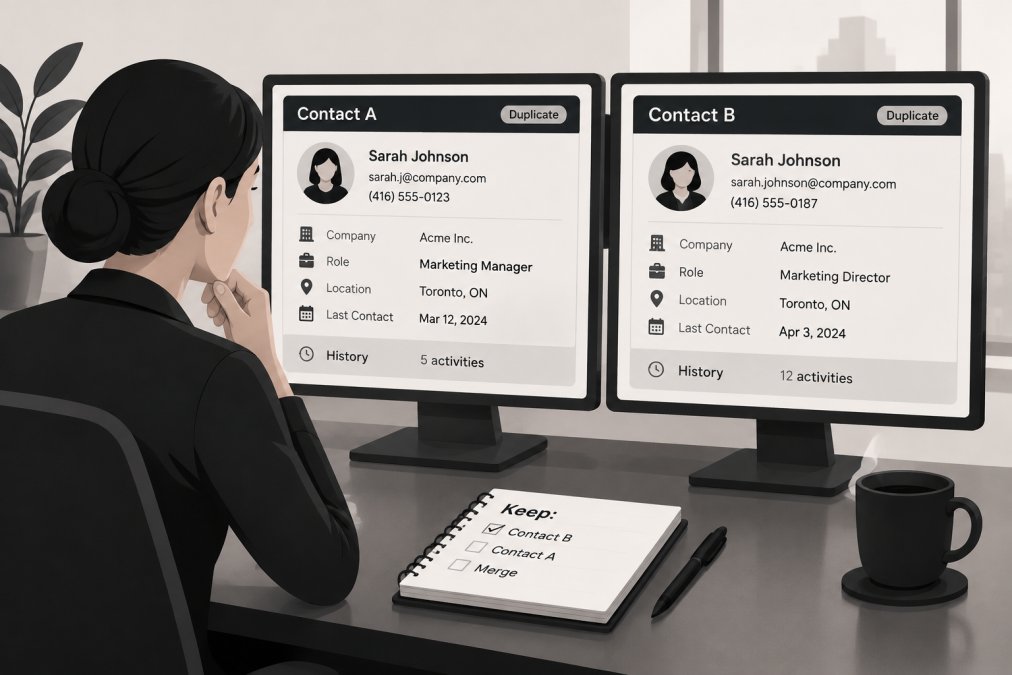
Step 1: Confirm the records describe one person. Before any merge, check whether the match is real. Two people can share a name at the same company, and families can share an email address or phone number. Use a simple decision tree:
- If email and mobile number both match, treat as a true duplicate and proceed.
- If only one strong identifier matches, check the activity history and company field before deciding.
- If only the name matches, do not merge. Leave the records separate and add a note explaining the similarity.
- If the records share an email but have different names and different companies, treat them as separate people and investigate why the email is shared.
Step 2: Pick the surviving record. Choose the one with the most complete history, not the oldest. Activity, notes, deal links, and consent records matter more than creation date.
Step 3: Reconcile conflicting values field by field. Open both records side by side and decide each field on its own merits:
- Email and phone: keep the most recently verified one, and keep the older value in a notes field if it may still be in use.
- Owner: keep the rep with the active relationship, not the original creator.
- Notes and activity: keep all of it. Never discard history to save a click.
- Consent and subscription status: keep the most restrictive valid consent state unless you can confirm the customer opted in again. Losing a consent record creates compliance risk that a merge cannot undo.
- Custom fields: keep the value that feeds your reporting, and note the discarded value if it affects a downstream system.
Step 4: Merge, then verify. After the merge, open the surviving record and confirm the activity log is complete, the consent state is correct, and deal or ticket links still resolve.
Step 5: Log the merge. Note the date, records involved, reason, and who approved it, giving you an audit trail if a merge is later questioned.
What most guides miss is the false positive problem. Two people can share a name at the same company, so confirm the records describe one person before any merge.
CRM Deduplication Tools: What to Look For
The best CRM deduplication tools do three things: detect, merge, and prevent. Many tools only do the first two, which is why duplicates return.
Check for these features before you commit:
- Custom matching rules. You need to set your own criteria, not accept fixed defaults.
- Bulk merge with preview. You should see exactly what will merge before it happens.
- Field-level merge control. The tool must let you choose values per field.
- History preservation. Activity and notes must carry over to the surviving record.
- Prevention at entry. Real-time duplicate alerts on forms and imports matter more than cleanup speed.
- Audit log. Every merge should be traceable.
For teams that want the process handled rather than managed, our tailored automation and operational services cover CRM optimization alongside workflow automation.
Platform choice matters less than rule design. A basic tool with well-tuned matching rules beats an advanced tool with defaults nobody reviewed.
Preventing Duplicates Across Web Forms, Imports, and Integrations
Prevention is a workflow, not a setting. You need a rule at every entry point where customer records get created, and you need to test each rule before it goes live.
Web forms. Turn on duplicate checking at submission. Match on normalized email first, then normalized mobile number, then name plus company as a fallback.
Imports. Always run a match check before upload.
Integrations. Audit every tool that pushes contacts. Set each to match on email or mobile number rather than create, and review new integrations before they go live.
Manual entry. Train the team to search by email or phone first, and make the search fast.
Standard formats. Set field rules for phone, postal code, and company name, and enforce them at entry. Normalize case and punctuation on email and phone before any match runs.
Test the whole pipeline. After configuring each source, submit the same customer through two different sources and confirm the CRM produces one record, not two. Repeat for a returning customer who changes their email address, since that is where match rules usually fail. Document the expected behavior for each source so the next admin can verify it.
For a broader view of data hygiene, see our guide on how to optimize a CRM system for better sales. If manual entry is the root cause, our step-by-step guide on how to automate manual data entry walks through the fix.
Booking a CRM Cleanup Consultation
Duplicates are a symptom. The cause is usually a process gap that a cleanup alone will not close.
If your team is spending hours each week reconciling records, a structured review can help locate the source of the problem. A structured review of your entry points and matching rules can show where records are created and how to close those gaps.
Results vary by business. One customer reported a 37% increase in closed deals in 90 days after its CRM workflows were rebuilt.
You can book a custom CRM optimization audit to get a clear picture of your duplicate rate and where it comes from. Or schedule your time with us to talk through your setup with our team.
Duplicate customer records will keep returning until the process that creates them changes. That means rules at every entry point, safe merge decisions, and someone who owns data quality.
Frequently Asked Questions
What fields should you use to match duplicate customer records?
Start with email address as the primary match field, then use mobile number and full name as secondary criteria. A combination of two or three fields catches more duplicates than any single field alone. Set exact matching for email and phone, and use fuzzy matching for names to catch spelling variations. Review any record that matches on only one field manually before merging, since shared office phone numbers or generic emails can create false positives.
Should you merge or delete duplicate CRM records?
Merge rather than delete in almost every case. Merging lets you keep the surviving record while folding in history, notes, and activity from the duplicate, so nothing is lost. Delete only when a record is genuinely empty or created in error, such as a test entry. Before deleting anything, export a backup of the record. If you are unsure whether two records are the same customer, leave them and flag them for manual review rather than risk losing real history.
How can you prevent duplicate contacts from web forms?
Add a real-time duplicate check to every web form so the CRM searches for an existing match on email or mobile number before creating a new record. If a match is found, route the submission to the existing record as an update instead of a new entry. Also standardize form fields, such as lowercasing emails, and connect forms to your CRM through one integration path rather than several, which is a common source of duplicate customer records.
How often should you check a CRM for duplicate records?
Run a duplicate scan weekly and a full audit quarterly. Weekly scans catch new duplicates from imports and form submissions before they spread into reporting and lead routing. The quarterly audit reviews your CRM duplicate detection rules, checks for false positives, and confirms that merged records kept their history. Assign one data owner to review scan results so cleanup does not stall between checks.